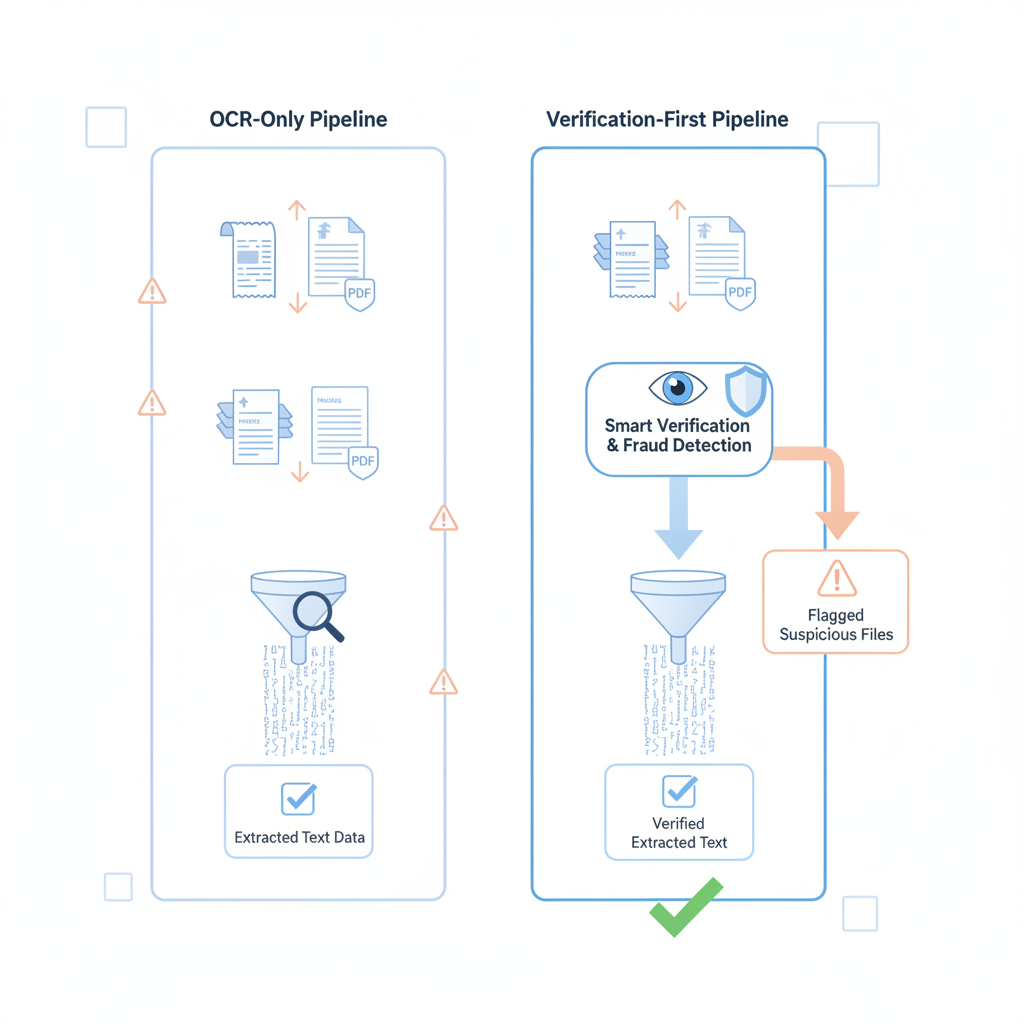
External workflow chatter keeps landing in the same place: teams compare OCR vendors, bank-statement parsers, receipt-extraction tools, and AP automation stacks as if the main decision is which system reads documents fastest.
That matters. It is just not the whole decision.
The buyer mistake: once extraction accuracy becomes the proxy for document trust, teams start approving, paying, underwriting, and automating based on files that were never actually authenticated.
DocVerify and an OCR-only pipeline do different jobs. The cleanest way to compare them is simple:
- OCR-only pipeline: turns a document into readable fields, rows, JSON, or workflow inputs.
- DocVerify: evaluates whether the uploaded PDF or image shows signs of tampering, recreation, screenshot laundering, or other authenticity risk before the rest of the workflow trusts it.
Why This Comparison Matters Right Now
A recent lending-software comparison from HyperVerge draws a useful line between low-cost PDF-to-spreadsheet converters and underwriting-grade bank-statement analysis platforms. That market split is real, but it still leaves one blind spot: even a strong extraction or underwriting stack can inherit trust from an uploaded file before anyone checks whether the file itself was manipulated.
Plaid makes a similar point from another direction. Its underwriting and income-automation materials keep expanding structured-data and anti-fraud workflows, while still acknowledging that uploaded income documents and bank statements remain a real fallback path in many stacks.
That is the modern environment: better extraction, better routing, better automation, and still a recurring file-trust gap.
What OCR-Only Pipelines Do Extremely Well
OCR and extraction systems are useful because they solve real operational pain:
- receipts become merchant, date, tax, and amount fields
- invoice PDFs become vendor, invoice-number, line-item, and total fields
- bank statements become transactions, balances, and cash-flow summaries
- uploaded screenshots or documents become structured inputs for agents, rules, or reviewers
That is valuable. Without extraction, teams stay trapped in manual review and rekeying work.
But OCR is optimized to answer what does this file say? It is not optimized to answer should this file be trusted?
What DocVerify Adds That OCR-Only Stacks Usually Do Not
Based on the current product and codebase, DocVerify is built for the earlier trust question.
Before the rest of the workflow treats a file as evidence, DocVerify can analyze PDFs and common image uploads for signals such as:
- metadata anomalies that do not fit the claimed origin of the file
- suspicious PDF structure and revision patterns that may indicate edit history
- screenshot and recompression traces that suggest recapture or flattened provenance
- font and glyph inconsistencies around numbers, names, totals, or balances
- clone or tamper indicators across localized document regions
- model-based suspicious-region localization so the reviewer knows where to look first
That is a different layer from OCR. It does not compete with reading. It changes whether the workflow should trust what got read.
A Practical Side-by-Side Comparison
| Question | OCR-only pipeline | DocVerify |
|---|---|---|
| What job does it do? | Extracts text, fields, rows, or structured data. | Assesses whether the uploaded file appears authentic before trust spreads. |
| Main success condition | The document parses cleanly. | The workflow gets a document-risk signal before approval or automation. |
| What it can miss | A manipulated document that still looks readable and internally plausible. | It does not replace downstream extraction, routing, or policy logic. |
| Best place in the workflow | After intake, when the file is ready for parsing or conversion. | Immediately after upload and before OCR, approval, underwriting, or agent actions. |
| Best buyer fit | Teams solving manual data entry and document-to-JSON conversion. | Teams making money, risk, or automation decisions from uploaded documents. |
Where the Difference Shows Up in Real Workflows
AP and ERP workflows
An OCR-only AP stack can read invoice fields, route coding, and support matching logic. It still may not tell you whether the uploaded invoice PDF itself was edited before approval. That is why AP teams often need a trust layer before extraction and payment logic. If this is your main workflow, read Invoice OCR Is Not Invoice Trust.
Expense automation
A receipt parser can extract merchant and amount perfectly while a forged or regenerated receipt still moves toward reimbursement. OCR quality does not resolve receipt authenticity.
Lending and underwriting
A bank-statement parser can summarize balances and transaction history accurately while a manipulated PDF still influences the underwriter. Clean rows are not proof that the uploaded statement deserves trust.
AI agents and automation pipelines
An agent can summarize, classify, and route a document exactly as designed while still inheriting the same trust mistake as the OCR layer underneath it. A smarter agent is not the same thing as a verified document.
The Better Architecture Is Verification First, Extraction Second
The strongest pattern is not DocVerify or OCR. It is DocVerify before OCR.
- User uploads a PDF or image.
- DocVerify runs first to produce a document-authenticity assessment.
- Low-risk files continue into OCR, parsing, policy checks, agent workflows, or approval logic.
- Suspicious files branch into exception review, replacement-file requests, or stronger source checks.
- Only then should the rest of the system act as if the file is ordinary evidence.
That sequence protects automation speed without letting automation create false confidence.
How to Decide Which One You Actually Need
If your biggest problem is manual rekeying, OCR may be enough to start.
If an uploaded document can trigger any of the following, OCR-only is usually too narrow:
- expense reimbursement
- invoice approval or payment
- loan underwriting or income review
- fraud screening or exception routing
- AI-agent actions on uploaded files
In those environments, the real design question is not “how accurately can we read this?” It is “what is our control before this readable file becomes trusted workflow evidence?”
Where DocVerify Fits
DocVerify is built for that pre-extraction trust decision. Teams can screen uploaded PDFs and common image formats through https://docverify.app before OCR, AP automation, lending review, or AI-agent workflows start treating the file as trustworthy input.
- Try DocVerify: https://docverify.app
- AP comparison: AP Automation OCR vs Document Verification
- Invoice workflow: Invoice OCR Is Not Invoice Trust
- Bank statement workflow: Bank Statement Verification Workflow