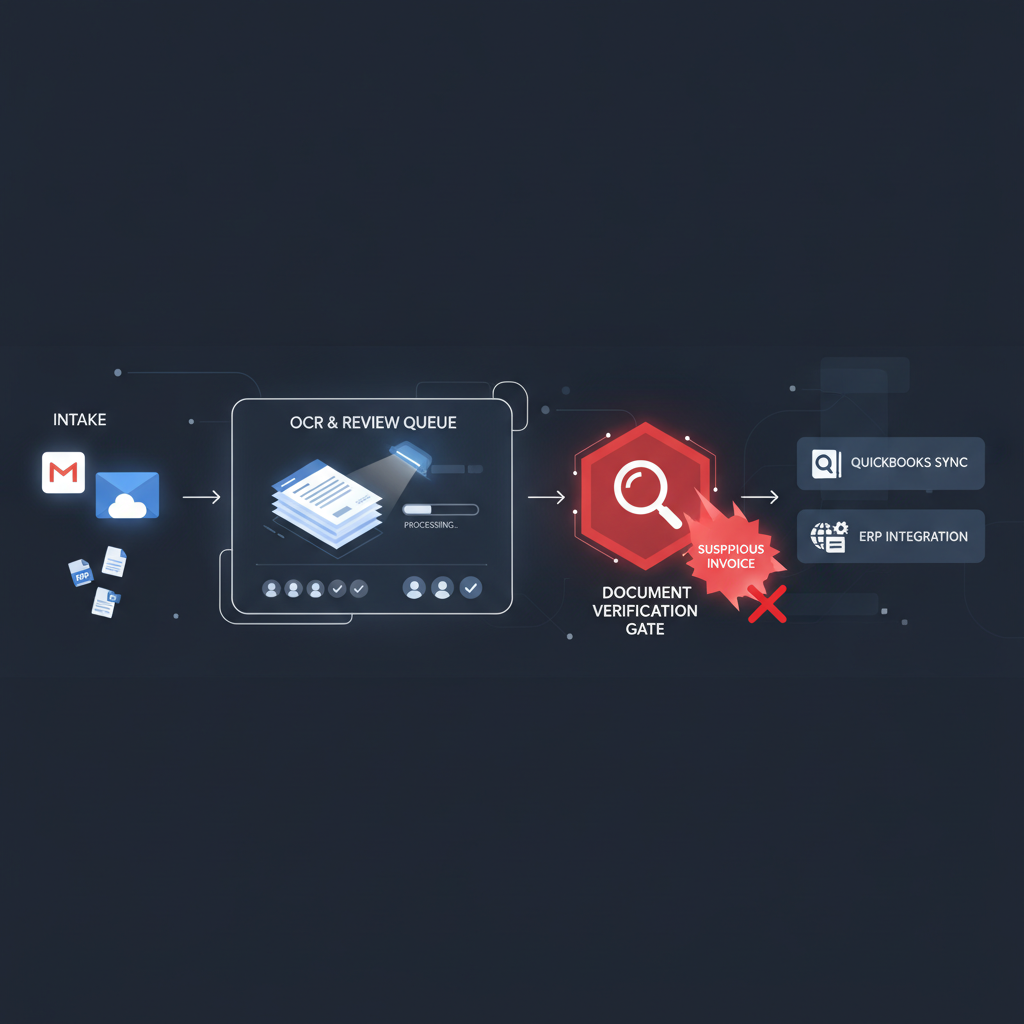
A useful AP automation pattern showed up again in workflow communities this month: invoices arrive in Gmail, get saved to Drive, run through OCR, land in a staging table, and then move into QuickBooks or a downstream approval system after review.
That is a much better workflow than manual rekeying. It is still missing one earlier decision.
The missing control: a clean review queue does not prove the uploaded invoice PDF was trustworthy before OCR, validation, and approval logic started building confidence around it.
Why This Pattern Matters Right Now
Finance teams are under pressure to reduce inbox work without opening up a fraud gap. So the architecture keeps converging on the same practical sequence:
- Gmail or shared inbox intake catches vendor invoices.
- Drive or cloud storage keeps the file available for downstream steps.
- OCR or extraction turns the invoice into structured fields.
- A review queue checks totals, required fields, duplicates, or approval status.
- QuickBooks, ERP, or payment workflow sync moves the case into the accounting system.
The external advice around these flows is usually reasonable: add validation flags, hold a pending-review table, and avoid writing straight into the ledger before someone checks the output.
That helps with extraction quality. It does not answer whether the original invoice file was edited before it ever reached the queue.
What the Review Queue Actually Verifies
Most invoice review queues are built to answer operational questions such as:
- Did OCR read the vendor, date, and amount?
- Do required fields exist?
- Does this look like a duplicate invoice number?
- Should this invoice wait for human approval before sync?
Those are worthwhile controls. They are still workflow controls, not document-trust controls.
A forged or edited invoice can still move through that system cleanly if the visible fields look coherent enough to extract and review.
Why Clean Extraction Can Still Be Bad Evidence
The most dangerous invoice in an automation pipeline is often not the one that breaks OCR. It is the one that extracts perfectly.
That can mean:
- an edited PDF invoice with changed totals, dates, or line items
- a bank-detail swap where the remittance section was altered but the rest of the invoice remains plausible
- a regenerated or re-exported file that hides edit history behind a normal-looking PDF
- a screenshot-heavy submission that flattens context and makes the queue trust the visible content too quickly
Once the extracted fields look tidy, the queue calms down around the document. That is the real risk. The workflow starts treating successful extraction as a proxy for authenticity.
The Better Sequence for AP Automation
The safer pattern is simple:
- Invoice arrives from Gmail, portal upload, EDI exception, or a shared folder.
- Document verification runs first on the original PDF or image.
- Low-risk files continue into OCR, field validation, duplicate checks, and review-queue logic.
- Suspicious files branch into a narrower exception path with forensic context attached.
- Only then should QuickBooks, Dynamics 365, SAP, or the payment workflow inherit trust from the invoice.
This does not slow the clean cases down much. It stops the queue from building orderly confidence on top of a questionable file.
What Verification Should Check
Based on the current DocVerify product and codebase, useful checks for invoice-intake workflows include:
- metadata and edit-history anomalies that do not fit the claimed document origin
- suspicious PDF structure suggesting overlays, revisions, or unusual assembly
- font and glyph inconsistencies around totals, invoice numbers, dates, or remittance details
- screenshot or recompression patterns that suggest the file is not an original source artifact
- tamper signals and suspicious-region localization so reviewers know where to look first
Those signals do not replace business rules or approvers. They answer the earlier question the queue cannot answer on its own: should this invoice file be trusted at document level?
Related AP reading: if your workflow pushes vendor invoices into approval or payment runs, read Invoice OCR Is Not Invoice Trust. The same control gap appears long before payment leaves the ERP.
Where DocVerify Fits
DocVerify is built for that intake-layer trust decision. AP teams and automation builders can screen uploaded PDFs and common image formats through https://docverify.app before OCR, queue review, approval routing, bookkeeping sync, or ERP posting start compounding trust around the file.
If your workflow starts with “save invoice from Gmail, extract fields, review, then sync,” you already have a process. What you may still be missing is a document-authenticity gate before that process starts trusting the attachment.
- Try DocVerify: https://docverify.app
- Related AP workflow: Invoice OCR Is Not Invoice Trust
- Broader automation angle: Confidence Scores Are Not Document Trust
- QuickBooks receipt angle: QuickBooks Receipt Capture Still Needs Verification