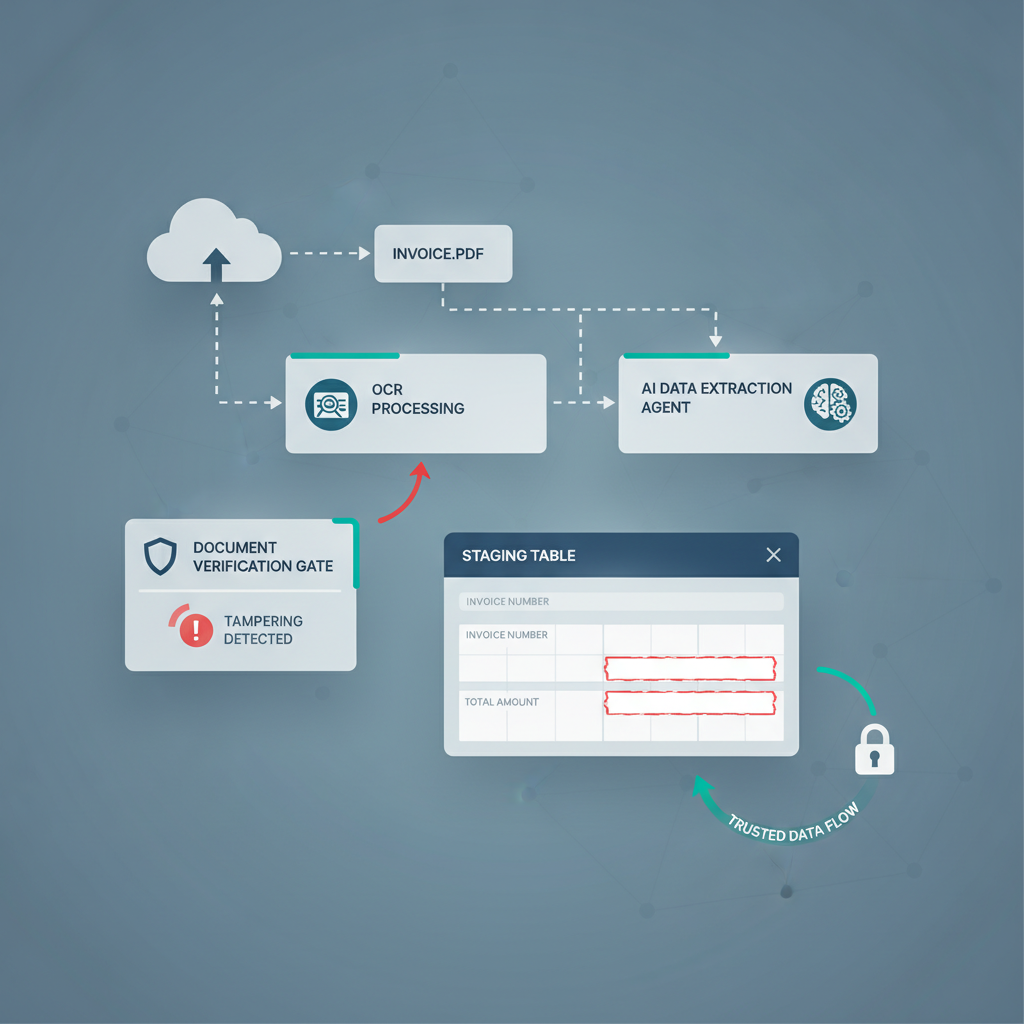
A useful pattern is showing up across AI automation communities in 2026.
Builders create a document pipeline, add OCR, add an LLM cleanup step, add validation, route the result into a staging table, and only then hand it off to Slack approval, Google Sheets, Xero, or an internal agent workflow.
That is already much better than blindly trusting extraction output. It is still not the same thing as verifying the document itself.
The missing control: confidence scores, schema checks, and human approval can all sit on top of a forged PDF. If the uploaded file never earned trust at document level, the rest of the automation is just organizing uncertainty more neatly.
Why This Is Coming Up Now
In early June 2026, a LangChain builder described hitting a wall with handwritten and messy documents. Their conclusion was sharp: confidence thresholds were not enough, because self-reported LLM confidence was not a durable basis for routing trust.
Around the same time, n8n builders kept sharing invoice flows that look increasingly production-ready: Gmail intake, OCR, structured extraction, validation checks, staging or approval steps, and finally sync into accounting tools.
Those patterns are healthy. They show the market maturing beyond “just send the PDF to a model and hope.”
But they also expose the remaining gap. Most of these workflows are designed to answer questions like:
- Did OCR read the fields clearly?
- Does the JSON validate?
- Do totals and required fields match?
- Should this case wait for a human?
Those are workflow questions. The earlier trust question is different:
Was the uploaded PDF or image authentic before the workflow started acting on it?
What Confidence Thresholds Actually Do Well
Confidence thresholds are useful when the problem is extraction quality.
If a scan is blurry, a table is handwritten, a line item is rotated, or the model returns malformed output, routing low-confidence cases to a human is smart. So is enforcing required fields, duplicate checks, total matching, vendor matching, and staging-table review.
That kind of design prevents a lot of ordinary automation failures:
- misread totals from poor image quality
- wrong row alignment in tables or complex layouts
- bad JSON or schema drift before data lands in Sheets or an ERP
- premature posting before an approver reviews the result
Those are all worth fixing.
They still do not prove the source document was genuine.
Why Document Trust Fails Even When the Workflow Looks Careful
A forged invoice or edited receipt does not need to confuse OCR to cause damage. In fact, the most dangerous document is usually the one that extracts cleanly.
That might mean:
- a cleanly edited invoice PDF with altered banking details or totals
- a regenerated receipt that looks routine to both OCR and a reviewer
- a screenshot or re-exported PDF that hides edit history while preserving readable text
- a manipulated bank statement page whose balances still parse perfectly
When that happens, the pipeline can still look disciplined:
- OCR succeeds
- the JSON validates
- totals appear internally consistent
- a human sees a plausible-looking document summary
- the agent resumes and pushes the case downstream
The automation is not broken. The trust assumption is.
This is exactly why a staging table or approval queue is not a full document-trust strategy on its own. It slows decisions down when the extraction looks risky. It does not tell you whether a cleanly extracted file was manipulated before upload.
The Better Pattern: Verify the File Before You Verify the Data
The safer architecture is simple:
- Document upload enters the workflow from email, portal, shared drive, API, or chat.
- Document verification runs first on the raw PDF or image.
- Clean files continue into OCR, LLM structuring, validation, and approval logic.
- Suspicious files branch into a smaller review queue with forensic context.
- Only trusted files resume into Sheets, Slack approval, ERP sync, Xero, QuickBooks, Dynamics 365, or the next agent step.
This does not replace the staging table. It makes the staging table smarter by attaching a trust signal before everything else compounds confidence around the upload.
What a Document Trust Layer Should Return
Based on the current DocVerify product and codebase, a useful trust layer for AI automation pipelines can return:
- a combined risk score and verdict bands
- metadata analysis for provenance and structural anomalies
- suspicious PDF or image structure signals
- font, glyph, clone, and tamper indicators
- screenshot and recompression clues
- model-based suspicious-region localization for reviewer focus
- structured output fields such as regions, content class, routed models, and AI review results for downstream branching
That matters because the workflow can now route on more than OCR confidence alone. It can distinguish:
- hard-to-read but probably genuine
- easy-to-read but suspicious
- clean enough to continue
- needs escalation before approval or sync
That is a much more useful operating model than treating “high confidence extraction” as a proxy for “safe to trust.”
Where This Matters Most in Finance and AP
The difference becomes expensive in finance workflows because downstream systems are built to move quickly once a document looks structured.
In invoice and AP automation, for example, OCR and approval orchestration can make a bad document look operationally ready. That is the same underlying trust problem described in Invoice OCR Is Not Invoice Trust: extraction and workflow quality can mask document fraud instead of stopping it.
The same logic applies to:
- n8n invoice flows that end in Slack approval or accounting sync
- agentic AP pipelines that summarize, classify, and route invoices automatically
- bank statement ingestion where parsed rows look tidy even if the source PDF was altered
- expense workflows where receipts move into reimbursement faster than anyone inspects them deeply
Confidence Is Still Useful. It Just Is Not Trust.
Keep the confidence scores. Keep the schema validation. Keep the human review queue.
Just stop asking those layers to answer a question they were never built to answer.
If your workflow depends on uploaded PDFs or images, the first decision should not be “can we extract this?” It should be “should we trust this file before extraction, approval, or agent handoff begins?”
That is where DocVerify fits. Teams can send uploaded documents through https://docverify.app before OCR, LLM cleanup, or ERP routing starts inheriting trust from the file.
- Try DocVerify: https://docverify.app
- Related AP reading: Invoice OCR Is Not Invoice Trust
- Workflow fit: DocVerify can sit in front of OCR, staging tables, Slack approval, agent callbacks, and ERP sync as a document-authenticity layer for uploaded files.