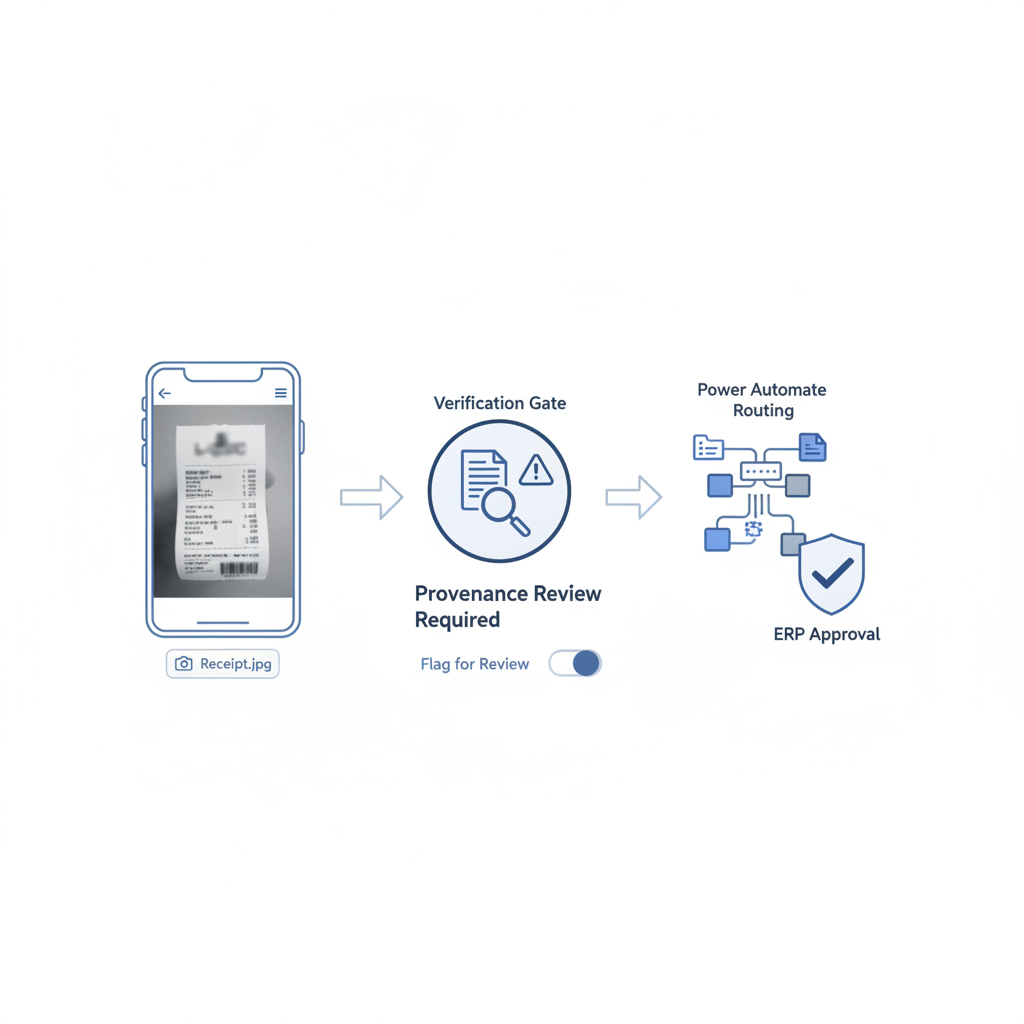
Expense software has trained teams to ask one operational question first: was a receipt attached?
That made sense when the main risk was missing paperwork. It breaks down once the uploaded file might be a screenshot, a forwarded image, a picture of another screen, or a cleaned-up copy of a manipulated receipt.
The control gap: attachment presence is not the same thing as document authenticity. A screenshot can move smoothly through OCR, approval routing, and reimbursement while stripping away the provenance signals reviewers would want most.
Why This Is Becoming a Real ERP Expense Problem
Microsoft’s current Dynamics 365 expense guidance is explicit about the workflow benefit: employees can attach receipt photos, OCR can extract fields, and approvers can review the attachment inside the approval flow. That is good workflow design. It is also a reminder that the system is optimized to move a file through the process once the file exists.
At the same time, finance and accounting discussions keep circling a more uncomfortable reality:
- screenshots get accepted when a “real” receipt is missing or inconvenient
- digitized PDFs are easy to edit before they are forwarded into expense review
- duplicate-looking or low-context attachments are often caught only after the fact
That combination is exactly why screenshot receipts deserve their own control conversation. They are not always fraudulent. They are simply a weaker trust artifact than teams often assume.
What the Workflow Sees Versus What It Cannot See
An ERP or expense stack usually sees a few useful things:
- a file exists
- the amount, merchant, and date can be read
- policy rules pass or fail
- the manager approved or rejected the claim
What it often cannot establish by default is whether the uploaded attachment is:
- the original receipt capture
- a screenshot of a receipt viewer or email preview
- a picture of a picture taken from another device
- a re-exported or edited PDF with the visible numbers changed
That matters because screenshots remove context. The employee may not be trying to commit fraud at all. But once your workflow accepts screenshots as normal evidence, it becomes easier for a manipulated document to blend into the same intake stream.
Why Screenshot Receipts Are a Special Risk Class
A screenshot is useful for convenience and terrible for provenance.
It can flatten out the difference between:
- an original merchant receipt
- a receipt opened in an email client and screenshotted
- a PDF that was edited first and captured afterward
- a receipt image that was copied between tools and recompressed several times
To a human approver, all four may look “good enough,” especially when the amount is small, the merchant is plausible, and the employee is not already on a watch list.
To OCR, they may all parse just fine.
That is why screenshot-heavy expense review quietly expands the fraud surface even when nobody changes the ERP rules.
How This Plays Out in Real ERP Environments
Dynamics 365 and Power Automate
The employee captures a receipt photo, attaches a file from mobile, or uploads a screenshot saved from email. OCR reads the amount. A Power Automate step routes the claim based on policy. The manager sees an attachment and an extracted total. Nothing in that sequence proves the file was an authentic original before upload.
SAP or Concur-style approval chains
The workflow is built to keep reimbursement moving. That is valuable. But if the “receipt” is really a screenshot of a modified PDF or a recreated image, the workflow is mostly validating business rules around a low-trust artifact.
QuickBooks-connected expense intake
Lean teams often rely on whatever evidence gets the reimbursement queue unstuck. A screenshot from a phone gallery or email attachment can be operationally acceptable, but it also means the bookkeeping system may be inheriting trust from a file with little original context left.
The Better Rule: Verify the Original File, Not Just the Visible Content
The right control is not “ban screenshots forever.” It is to stop treating screenshots as equal to original receipts by default.
A safer pattern looks like this:
- Upload intake: accept the file, but classify whether it appears to be an original capture, a screenshot, a re-export, or another low-context artifact.
- Verification step: analyze the raw file before OCR and approval logic add confidence around it.
- Routing: let low-risk original files continue normally and send screenshot-heavy or suspicious files into a narrower review queue.
- Approval: reviewers see not only the amount and policy result, but also the document-trust signal.
That keeps the workflow fast for good documents while making screenshot-based evidence a reviewable condition instead of a silent default.
What a Verification Layer Should Check
Based on the current DocVerify product and codebase, useful checks for screenshot-heavy expense workflows include:
- metadata anomalies that conflict with the claimed document origin
- screenshot or recompression patterns that suggest the file is not an original capture
- font and glyph inconsistencies around totals, dates, and merchant details
- clone or tamper signals in edited regions
- suspicious image or PDF structure
- model-based suspicious-region localization so a reviewer knows where to look first
Those checks do not replace your ERP, your policy engine, or your manager approval chain. They answer the earlier question the workflow does not answer on its own: what kind of file are we trusting here?
Why This Matters for AP and Finance Controllers
For controllers, AP managers, and ERP admins, the risk is not only reimbursement leakage. It is normalization.
Once teams get comfortable approving screenshots, forwarded crops, and low-context attachments, the workflow becomes easier to game without triggering obvious duplicate or policy rules.
That is the same broader AP lesson behind Invoice OCR Is Not Invoice Trust: a tidy downstream workflow can still compound trust around a manipulated document if the trust decision happens too late.
A Receipt Attached Is Not the Same as a Receipt Verified
If your expense process runs through Dynamics 365, SAP, QuickBooks, or a connected approval layer, the practical question is not whether the employee uploaded something. It is whether the uploaded file deserves trust before OCR, approval rules, reimbursement, or ERP posting start building certainty around it.
That is where DocVerify fits. Teams can send uploaded PDFs and common image formats through https://docverify.app before approval workflows inherit trust from screenshot-style evidence or edited receipts.
- Try DocVerify: https://docverify.app
- Related AP reading: Invoice OCR Is Not Invoice Trust
- Workflow fit: DocVerify can sit in front of OCR, Power Automate, expense approval queues, and ERP posting as a document-authenticity layer for uploaded receipts and screenshots.